
SteerEase – Stay Focused with Hands-Free Wireless Driving Control
Drive safer with effortless hands-free control!
Tired of juggling your phone while driving? Stay focused and reduce distractions with easy access to navigation, calls, and music – all in one place. Experience safer, stress-free drives with crystal-clear control right at your fingertips.

Why our customers love this product!
✔ Drive safer with hands-free control: Wireless integration allows you to control calls, navigation, and media without touching your phone, so you can keep your eyes on the road and hands on the wheel.
✔ Clear, bright screen for easy viewing: The vibrant 9 inch Full HD screen makes maps and videos sharp and easy to read both day and night, ensuring you never miss a turn or street sign again.
✔ Easier parking with optional rearview camera: The rearview camera provides a clear view of obstacles behind your vehicle, making parking safer, quicker, and less stressful.
Frequently Asked Questions
How do wireless CarPlay and Android Auto enhance safety on the road?
They reduce the need to operate your phone by allowing hands-free control of navigation, calls, and music. This minimizes distractions, so you can fully focus on driving.
Is the touchscreen easy to see in bright sunlight or at night?
Yes, the 9 inch Full HD IPS screen is designed to remain bright and clear under all lighting conditions, ensuring maps and videos are always easily visible.
Do I need a professional to install the rearview camera?
No, the rearview camera is designed for quick and easy installation that you can perform yourself. This saves time and cost while enhancing parking safety.
Technical Specifications
Screen Size: 9 inch Full HD IPS touchscreen
Compatibility: Wireless CarPlay and Android Auto
Optional Features: Rearview camera for parking assistance
Package Contents
Wireless SteerEase and Android Auto unit
9 inch Full HD touchscreen display
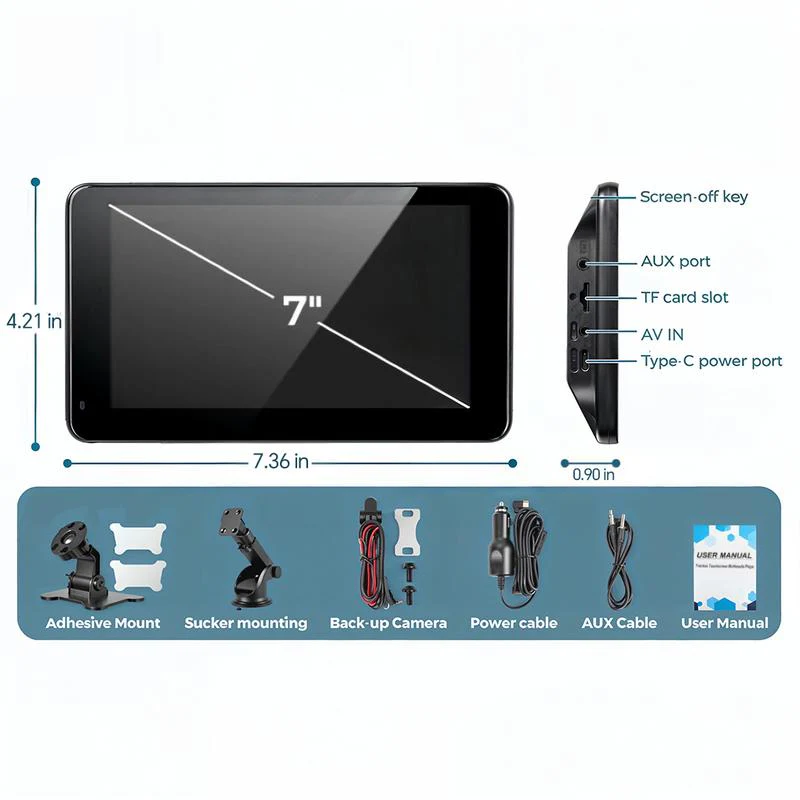
Optional rearview camera and installation kit
All necessary cables and connectors
User manual and installation guide
More Images


SteerEase – Stay Focused with Hands-Free Wireless Driving Control
Drive safer with effortless hands-free control!
Tired of juggling your phone while driving? Stay focused and reduce distractions with easy access to navigation, calls, and music – all in one place. Experience safer, stress-free drives with crystal-clear control right at your fingertips.
Why our customers love this product!
✔ Drive safer with hands-free control: Wireless integration allows you to control calls, navigation, and media without touching your phone, so you can keep your eyes on the road and hands on the wheel.
✔ Clear, bright screen for easy viewing: The vibrant 9 inch Full HD screen makes maps and videos sharp and easy to read both day and night, ensuring you never miss a turn or street sign again.
✔ Easier parking with optional rearview camera: The rearview camera provides a clear view of obstacles behind your vehicle, making parking safer, quicker, and less stressful.
Frequently Asked Questions
How do wireless CarPlay and Android Auto enhance safety on the road?
They reduce the need to operate your phone by allowing hands-free control of navigation, calls, and music. This minimizes distractions, so you can fully focus on driving.
Is the touchscreen easy to see in bright sunlight or at night?
Yes, the 9 inch Full HD IPS screen is designed to remain bright and clear under all lighting conditions, ensuring maps and videos are always easily visible.
Do I need a professional to install the rearview camera?
No, the rearview camera is designed for quick and easy installation that you can perform yourself. This saves time and cost while enhancing parking safety.
Technical Specifications
Screen Size: 9 inch Full HD IPS touchscreen
Compatibility: Wireless CarPlay and Android Auto
Optional Features: Rearview camera for parking assistance
Package Contents
Wireless SteerEase and Android Auto unit
9 inch Full HD touchscreen display
Optional rearview camera and installation kit
All necessary cables and connectors
User manual and installation guide
Product Information
Product Information
Shipping & Returns
Shipping & Returns
Description
Drive safer with effortless hands-free control!
Tired of juggling your phone while driving? Stay focused and reduce distractions with easy access to navigation, calls, and music – all in one place. Experience safer, stress-free drives with crystal-clear control right at your fingertips.
Why our customers love this product!
✔ Drive safer with hands-free control: Wireless integration allows you to control calls, navigation, and media without touching your phone, so you can keep your eyes on the road and hands on the wheel.
✔ Clear, bright screen for easy viewing: The vibrant 9 inch Full HD screen makes maps and videos sharp and easy to read both day and night, ensuring you never miss a turn or street sign again.
✔ Easier parking with optional rearview camera: The rearview camera provides a clear view of obstacles behind your vehicle, making parking safer, quicker, and less stressful.
Frequently Asked Questions
How do wireless CarPlay and Android Auto enhance safety on the road?
They reduce the need to operate your phone by allowing hands-free control of navigation, calls, and music. This minimizes distractions, so you can fully focus on driving.
Is the touchscreen easy to see in bright sunlight or at night?
Yes, the 9 inch Full HD IPS screen is designed to remain bright and clear under all lighting conditions, ensuring maps and videos are always easily visible.
Do I need a professional to install the rearview camera?
No, the rearview camera is designed for quick and easy installation that you can perform yourself. This saves time and cost while enhancing parking safety.
Technical Specifications
Screen Size: 9 inch Full HD IPS touchscreen
Compatibility: Wireless CarPlay and Android Auto
Optional Features: Rearview camera for parking assistance
Package Contents
Wireless SteerEase and Android Auto unit
9 inch Full HD touchscreen display
Optional rearview camera and installation kit
All necessary cables and connectors
User manual and installation guide